Detail Liveness Detection
Secure, real-time authentication is at the core of FACIA. Our advanced Liveness Detection technology goes beyond traditional image capturing by recording a video during authentication. It actively detects natural human behaviors, like eye blinking, to guarantee that a real person is present. This dynamic verification process eliminates spoofing threats and ensures that unauthorized access is strictly blocked.
Liveness Verification Instructions
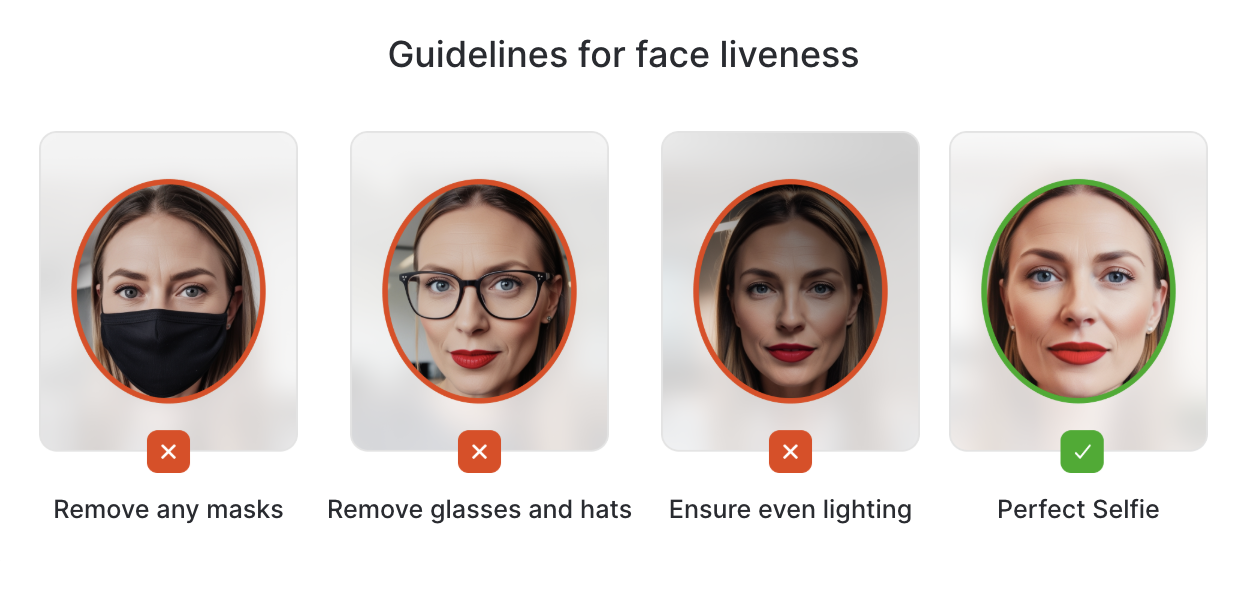
To ensure a successful liveness verification, please follow the guidelines below:
- Use the built-in camera of your device for optimal performance.
- Ensure proper lighting — your face should be well-lit and not under or overexposed.
- Keep your facial features clearly visible at all times.
- Do not wear any masks, glasses, or accessories that may obscure your face.
- Align your face within the oval frame displayed on the screen throughout the verification process.
Generate Liveness URL
To generate the Liveness verification, send a request to the following endpoint with the mentioned sample payload. The liveness URL can be obtained from the API at:
Endpoint
POSThttps://api.facia.ai/generate-liveness-url
Authorization:
Token Type: BearerDescription:
This API utilizes Access token or Client-Secret key in header for authentication.
You can use your client_id and client_secret key when using the "/request-access-token" endpoint to obtain a Bearer token for authorization while connecting to this API. For additional details on Authorization, click Here

Request Body Samples:
- HTTP
- Javascript
- Curl
- PHP
- Python
- Ruby
- Java
- C#
- Go
//POST /generate-liveness-url  HTTP/1.1
//Host: api.facia.ai
//Content-Type: application/json
//Authorization: Bearer <access-token-here>

{
"redirect_url": "https://www.example.com",
"callback_url": "https://www.example.exc.com",
"customer_id": "your_customer_id_here",
"customer_email": "test@example.com",
"is_dl_request": true,
"customer_name": "your_customer_name_here",
"ttl": 60
}
var myHeaders = new Headers();
myHeaders.append("client-secret", "your_client_secret_here");
myHeaders.append("Content-Type", "application/x-www-form-urlencoded");

var urlencoded = new URLSearchParams();
urlencoded.append("redirect_url", "https://www.example.com");
urlencoded.append("callback_url", "https://www.example.exc.com");
urlencoded.append("customer_id", "your_customer_id_here");
urlencoded.append("customer_email", "test@example.com");
urlencoded.append("is_dl_request", "true");
urlencoded.append("customer_name", "your_customer_name_here");
urlencoded.append("ttl", 60);


var requestOptions = {
  method: 'POST',
  headers: myHeaders,
  body: urlencoded,
  redirect: 'follow'
};

fetch("https://api.facia.ai/generate-liveness-url", requestOptions)
  .then(response => response.text())
  .then(result => console.log(result))
  .catch(error => console.log('error', error));
curl --location 'https://api.facia.ai/generate-liveness-url' \
--header 'Content-Type: application/json' \
--data-raw '{
"redirect_url": "https://www.example.com",
"callback_url": "https://www.example.exc.com",
"customer_id": "your_customer_id_here",
"customer_email": "test@example.com",
"is_dl_request": true,
"customer_name": "your_customer_name_here",
"ttl": 60
}'
<?php

  $curl = curl_init();

  curl_setopt_array($curl, array(
    CURLOPT_URL => 'https://api.facia.ai/generate-liveness-url',
    CURLOPT_RETURNTRANSFER => true,
    CURLOPT_ENCODING => '',
    CURLOPT_MAXREDIRS => 10,
    CURLOPT_TIMEOUT => 0,
    CURLOPT_FOLLOWLOCATION => true,
    CURLOPT_HTTP_VERSION => CURL_HTTP_VERSION_1_1,
    CURLOPT_CUSTOMREQUEST => 'POST',
    CURLOPT_POSTFIELDS => 'redirect_url=https%3A%2F%2Fwww.facia.ai&callback_url=https%3A%2F%2Fwww.facia.ai&customer_id=your_customer_id_here&ttl=60&customer_email=test%40example.com&customer_name=your_customer_name_here&is_dl_request=true',
    CURLOPT_HTTPHEADER => array(
      'client-secret: your_client_secret_here',
      'Content-Type: application/x-www-form-urlencoded'
    ),
  ));

  $response = curl_exec($curl);

  curl_close($curl);
  echo $response;
import requests
url = "https://api.facia.ai/generate-liveness-url"
payload='redirect_url=https%3A%2F%2Fwww.facia.ai&callback_url=https%3A%2F%2Fwww.facia.ai&customer_id=your_customer_id_here&ttl=60&customer_email=test%40example.com&customer_name=your_customer_name_here&is_dl_request=true'
headers = {
  'client-secret': 'your_client_secret_here',
  'Content-Type': 'application/x-www-form-urlencoded'
}
response = requests.request("POST", url, headers=headers, data=payload)
print(response.text)
require 'net/http'
require 'uri'

url = URI.parse('https://api.facia.ai/generate-liveness-url')
http = Net::HTTP.new(url.host, url.port)
http.use_ssl = true
payload = 'redirect_url=https%3A%2F%2Fwww.facia.ai&callback_url=https%3A%2F%2Fwww.facia.ai&customer_id=your_customer_id_here&ttl=60&customer_email=test%40example.com&customer_name=your_customer_name_here&is_dl_request=true'
request = Net::HTTP::Post.new(url.path, {'Content-Type' => 'application/x-www-form-urlencoded', 'client-secret' => 'your_client_secret_here'})
request.body = payload
response = http.request(request)
puts response.body
import java.io.BufferedReader;
import java.io.InputStreamReader;
import java.io.OutputStream;
import java.net.HttpURLConnection;
import java.net.URL;
import java.nio.charset.StandardCharsets;
import java.io.UnsupportedEncodingException;
import java.net.URLEncoder;

public class Main {
    public static void main(String[] args) {
        try {
            URL url = new URL("https://api.facia.ai/generate-liveness-url");
            HttpURLConnection connection = (HttpURLConnection) url.openConnection();
            connection.setRequestMethod("POST");
            connection.setDoOutput(true);

            // Corrected payload with properly encoded email
            String payload = "redirect_url=https%3A%2F%2Fwww.facia.ai&callback_url=https%3A%2F%2Fwww.facia.ai&customer_id=your_customer_id_here&ttl=60&customer_email=test%40example.com&customer_name=your_customer_name_here&is_dl_request=true";

            byte[] postData = payload.getBytes(StandardCharsets.UTF_8);

            connection.setRequestProperty("Content-Type", "application/x-www-form-urlencoded");

            // Replace "YOUR_CLIENT_SECRET" with your actual client secret
            connection.setRequestProperty("client-secret", "YOUR_CLIENT_SECRET");

            try (OutputStream outputStream = connection.getOutputStream()) {
                outputStream.write(postData);
            }

            int responseCode = connection.getResponseCode();
            if (responseCode == HttpURLConnection.HTTP_OK) {
                BufferedReader reader = new BufferedReader(new InputStreamReader(connection.getInputStream()));
                StringBuilder response = new StringBuilder();
                String line;

                while ((line = reader.readLine()) != null) {
                    response.append(line);
                }

                reader.close();
                System.out.println(response.toString());
            } else {
                System.out.println("Request failed with response code: " + responseCode);
                System.out.println("Response message: " + connection.getResponseMessage());
            }

        } catch (Exception e) {
            e.printStackTrace();
        }
    }
}
using System;
using System.Net.Http;
using System.Text;
using System.Threading.Tasks;
using System.Web;

class Program
{
    static async Task Main()
    {
        using (HttpClient client = new HttpClient())
        {
            string url = "https://api.facia.ai/generate-liveness-url";
            string encodedPayload = "redirect_url=https%3A%2F%2Fwww.facia.ai&callback_url=https%3A%2F%2Fwww.facia.ai&customer_id=your_customer_id_here&ttl=60&customer_email=test%40example.com&customer_name=your_customer_name_here&is_dl_request=true";
            string payload = HttpUtility.UrlDecode(encodedPayload);
            client.DefaultRequestHeaders.Add("client-secret", "your_client_secret_here");
            HttpResponseMessage response = await client.PostAsync(url, new StringContent(payload, Encoding.UTF8, "application/x-www-form-urlencoded"));
            if (response.IsSuccessStatusCode)
            {
                string responseBody = await response.Content.ReadAsStringAsync();
                Console.WriteLine(responseBody);
            }
            else
            {
                Console.WriteLine($"Error: {response.StatusCode}");
            }
        }
    }
}
package main

import (
    "bytes"
    "fmt"
    "net/http"
    "net/url"
)

func main() {
    url := "https://api.facia.ai/generate-liveness-url"
    client := &http.Client{}

    payload := "redirect_url=https%3A%2F%2Fwww.facia.ai&callback_url=https%3A%2F%2Fwww.facia.ai&customer_id=your_customer_id_here&ttl=60&customer_email=test%40example.com&customer_name=your_customer_name_here&is_dl_request=true"
    decodedPayload, err := url.QueryUnescape(payload)
    if err != nil {
        fmt.Println("Error decoding payload:", err)
        return
    }
    req, err := http.NewRequest("POST", url, bytes.NewBufferString(decodedPayload))
    if err != nil {
        fmt.Println("Error creating request:", err)
        return
    }
    req.Header.Set("Content-Type", "application/x-www-form-urlencoded")
    req.Header.Set("client-secret", "your_client_secret_here")
    resp, err := client.Do(req)
    if err != nil {
        fmt.Println("Error making request:", err)
        return
    }
    defer resp.Body.Close()
    buf := new(bytes.Buffer)
    buf.ReadFrom(resp.Body)
    fmt.Println(buf.String())
}
Request Parameter
| Parameters | Description |
|---|---|
| redirect_url | Required: No Type: String Example: redirect_url = https://www.example.com/?64db8940a619c1692109120 Indicate the URL to be used for post-transaction redirection. |
| callback_url | Required: No Type: String Example: callback_url=https://www.example.exc.com/ Multiple server-to-server calls are initiated to communicate updates on verification status to Facia’s clients. This functionality ensures that clients can maintain real-time updates on their end, even if the end-user's session is interrupted during the process. |
| customer_id | Required: No Type: String Example: customer_id="your_customer_id_here" The id of customer for whom link is being generated. |
| customer_email | Required: No Type: String Example: customer_email=test@example.com The email of customer for whom link is being generated. |
| customer_name | Required: No Type: String Example: customer_name=your_customer_name_here The name of customer for whom link is being generated. |
| ttl | Required: No Type: Integer Example: ttl=60 Minimum: 1 minute Maximum: 43200 minutes (30 days) Default: 60 minutes The 'ttl' parameter specifies the time-to-live (ttl) in minutes, indicating the duration until the link expires. |
| is_dl_request | Required: No Type: Boolean Example: is_dl_request=true Default: false The 'is_dl_request' parameter specifies that whether te request is detailed liveness or not. if is_dl_request is not passed than the request will default to 3D liveness detection. |
Response Sample
{
  "status": true,
  "message": "Success",
  "result": {
    "data": {
      "liveness_url": "https://app.facia.ai/?64db8940a619c1692109120",
      "reference_id": "your_reference_id_here",
      "callback_url": "https://www.example.exc.com",
      "customer_id": "your_customer_id_here",
      "customer_email": "test@example.com",
      "customer_name": "your_customer_name_here",
      "redirect_url": "https://www.example.com"
    }
  }
}
Response Parameter
| Parameters | Description |
|---|---|
| liveness_url | The link to perform liveness. Example: liveness_url=https://app.facia.ai/?64db8940a619c1692109120 |
| reference_id | The unique identified associated with the created transaction. |
| callback_url | The link where the transaction response will be sent. Example: callback_url=https://www.example.exc.com/ |
| customer_id | Contains the unique ID defined for the end user. Example: customer_id="your_customer_id_here" |
| customer_email | This key includes the email that belongs to the end user. Example: customer_email=test@example.com |
| customer_name | This key includes the name of the end user. Example: customer_name=your_customer_name_here |
| redirect_url | Indicate the URL to be used for post-transaction redirection. |
| customer_name | This key includes the name of the end user. |
| language | This key includes the language of the end user. |
customer_id, customer_email and customer_name are returned only when customer details are sent in the request. If customer_id is sent without customer_email or customer_name, the fields that were not sent are returned as null.
iFrame Integration
Integrate the liveness iFrame into your platform to ensure users are physically present during interactions. Use the code snippet below to embed the iframe and pass the liveness_url which you got in response of generate-liveness-url endpoint within the src attribute of the iFrame.
<iframe
  src="liveness_url"
  allow="camera"
  style="width: 100%; height: 600px; border: none;"
></iframe>
For optimal user experience, we recommend:
- Minimum width: 375px
- Minimum height: 600px
- Responsive layout that adjusts to the container size
Listening to Events from the iFrame
To handle the iFrame communication and capture the events emitted from the liveness verification process, you can use the window.addEventListener method to listen for message events. These events are sent using the postMessage API from the iFrame to the parent window. Here's a detailed explanation and example implementation:
Listening to iFrame Events
The iFrame sends the following events to the parent window:
1. proofSubmitted
- Purpose: Indicates that the user has submitted the required proof for verification.
- Response Structure:
{
  "event": "proofSubmitted",
  "response": {
    "message": "Proof Submitted"
  }
}
2. livenessProcessing
- Purpose: Indicates that the liveness verification is in progress.
- Response Structure:
{
  "event": "livenessProcessing",
  "response": {
    "message": "Liveness Processing"
  }
}
3. livenessResultReceived
- Purpose: Indicates that the liveness verification result has been received.
- Response Structure (Success):
{
  "event": "livenessResultReceived",
  "response": {
    "message": "Liveness Passed",
    "client_reference": "your_client_reference_here",
    "liveness_response": "<liveness_response>",
    "liveness_score": "<liveness_score>",
    "reference_id": "your_reference_id_here",
    "proof": "<accepted_proof>"
  }
} - Response Structure (Failure):
{
  "event": "livenessResultReceived",
  "response": {
    "message": "Liveness Failed",
    "client_reference": "your_client_reference_here",
    "liveness_response": "<liveness_response>",
    "liveness_score": "<liveness_score>",
    "reference_id": "your_reference_id_here",
    "proof": "<declined_proof>"
  }
}
Implementation Example
Here's how to listen for these events:
// Add an event listener for messages from the iFrame
window.addEventListener("message", (event) => {
  // Verify the origin of the message
  if (event.origin !== "https://app.facia.ai") {
    return; // Reject messages from unauthorized sources
  }

  // Handle the received event
  const { event: eventName, response } = event.data || {};

  switch (eventName) {
    case "proofSubmitted":
      console.log("Proof submitted:", response.message);
      // Handle proof submission logic
      break;

    case "livenessProcessing":
      console.log("Liveness verification in progress:", response.message);
      // Handle liveness processing logic
      break;

    case "livenessResultReceived":
      if (response.message === "Liveness Passed") {
        console.log("Liveness verification passed:", response);
        // Handle success logic
      } else if (response.message === "Liveness Failed") {
        console.error("Liveness verification failed:", response);
        // Handle failure logic
      }
      break;

    default:
      console.warn("Unknown event received:", eventName);
  }
});